What Is Meta Ads Management and How Do You Get It Right?
Meta ads management is the process of creating, running, optimizing, and scaling paid advertising campaigns across Facebook, Instagram, Messenger, and WhatsApp — all from a single platform called Meta Ads Manager.
If you’re looking for a quick breakdown of what this involves:
| What You Need | What It Does |
|---|---|
| Meta Ads Manager account | Central hub to build and manage all campaigns |
| Campaign objective | Tells Meta your goal (sales, leads, traffic, etc.) |
| Audience targeting | Defines who sees your ads |
| Ad creative | The images, videos, or copy in your ads |
| Budget and bidding | Controls how much you spend and how Meta optimizes delivery |
| Performance tracking | Measures results so you can improve over time |
Whether you handle it yourself or hire a professional, getting these six elements right is what separates profitable campaigns from wasted ad spend.
Meta Ads Manager — formerly known as Facebook Ads Manager — is now one of the most powerful advertising tools available to businesses of any size. With over 10 million downloads of the mobile app on Google Play alone and a 4.5-star rating from tens of thousands of App Store reviews, it’s clear that marketers worldwide rely on it daily.
But powerful doesn’t always mean easy. For small business owners juggling limited time and budget, the platform’s depth can feel overwhelming fast.
That’s exactly why this guide exists.
I’m Fernando Larez, a marketing professional and business leader based in Hollywood, Florida, with hands-on experience running meta ads management campaigns across multiple industries — from lead generation to eCommerce. In the sections ahead, I’ll walk you through everything you need to build, manage, and grow profitable Meta ad campaigns without the confusion.
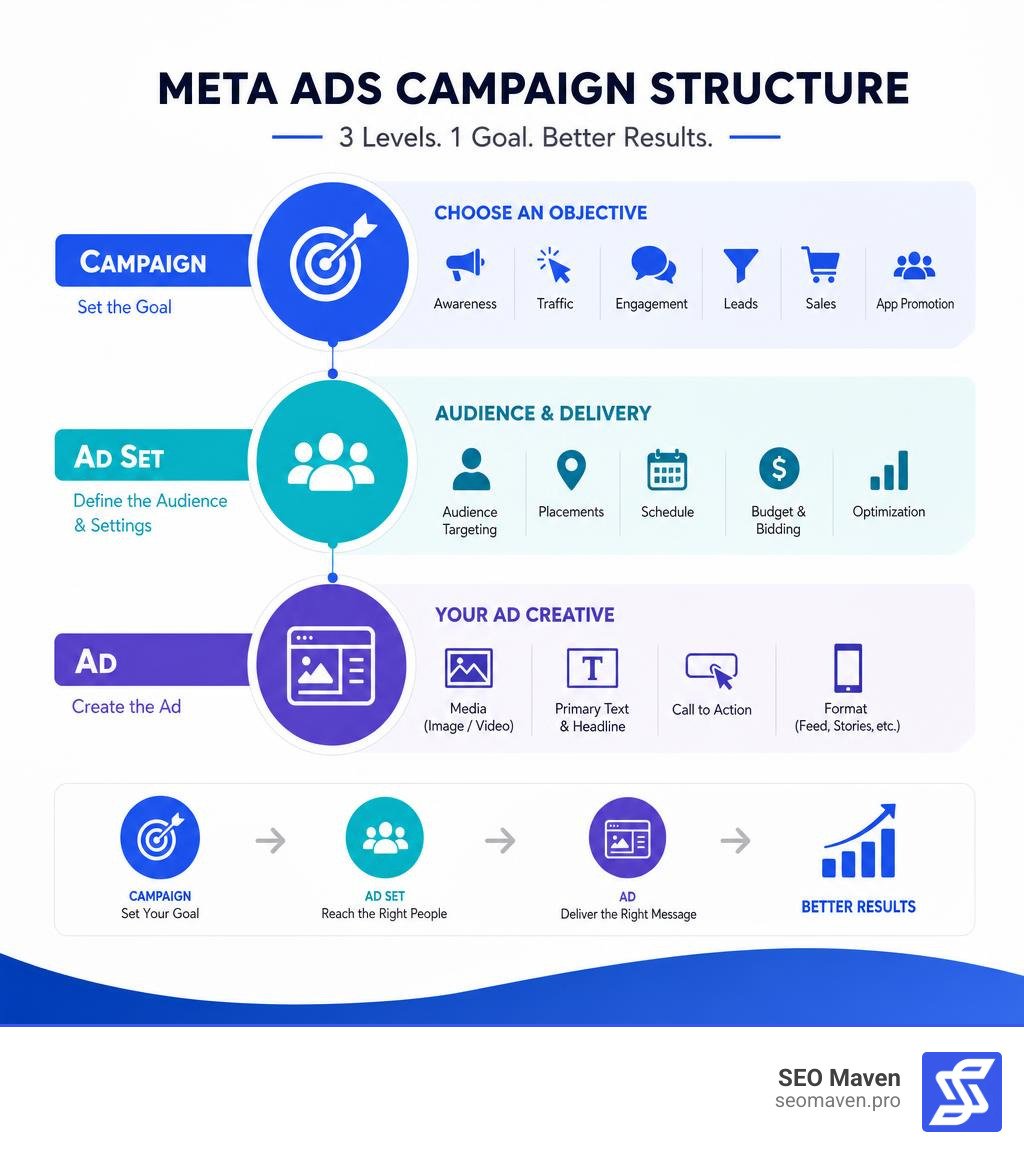
Simple guide to meta ads management terms:
Getting Started with Meta Ads Management
Stepping into paid social advertising can feel like learning a completely new language. However, once we break down the initial setup and get a feel for the landscape, the path to running profitable campaigns becomes much clearer. Let’s start with the absolute essentials: setting up your digital command center.
Setting Up Your Meta Business Ad Account
Before we can write a single line of ad copy or upload a creative asset, we need to establish our foundational infrastructure. The heart of your operations is the Meta Business Suite. Think of the Business Suite as your corporate headquarters, while the individual ad accounts are the storefronts.
To set up your account properly and avoid future headaches, follow these steps:
- Create Your Business Account: Navigate to the Meta Business Suite and create a business account. You will need to provide your legal business name, your business email, and basic contact details.
- Set Up the Ad Account: Within your Business Suite settings, locate the “Ad Accounts” tab. Click “Add” and select “Create a new ad account.” Be extremely careful when choosing your time zone and local currency here — once these are saved, you cannot change them.
- Configure Payment Methods & Billing Settings: Link a reliable credit card or payment method to your ad account. We highly recommend setting up a secondary backup payment method. Meta is notoriously strict; a single failed transaction can temporarily pause all active campaigns and disrupt your optimization momentum.
- Assign User Permissions and Partner Access: If you are working with a boutique digital marketing team (like ours here in South Florida!), you do not need to hand over your personal login credentials. Instead, you can assign secure “Partner” access using our Business Manager ID. For internal team members, utilize system user tokens and granular role assignments (e.g., Administrator, Advertiser, or Analyst) to maintain tight security control.
Setting things up correctly from day one ensures you won’t lose access to your assets later. If you want a more lighthearted, sanity-saving look at this process, check out our guide on How to Navigate Meta Ad Manager Without Crying.
Navigating the Meta Ads Manager Interface
Once your account is active, it is time to open up the actual Ads Manager interface. At first glance, it looks like a massive, data-dense spreadsheet, but it is organized in a highly logical, three-tiered structure:
- The Campaign Tab: This is where you declare your overall business objective (e.g., getting more leads, driving website sales, or boosting brand awareness).
- The Ad Set Tab: This is where the tactical decisions live. You define your target audience, choose your ad placements (like Instagram Reels, Facebook Feed, or Messenger), set your daily budget, and choose your bidding strategy.
- The Ads Tab: The creative layer. This is where you upload your images, videos, carousel cards, headlines, and primary text.
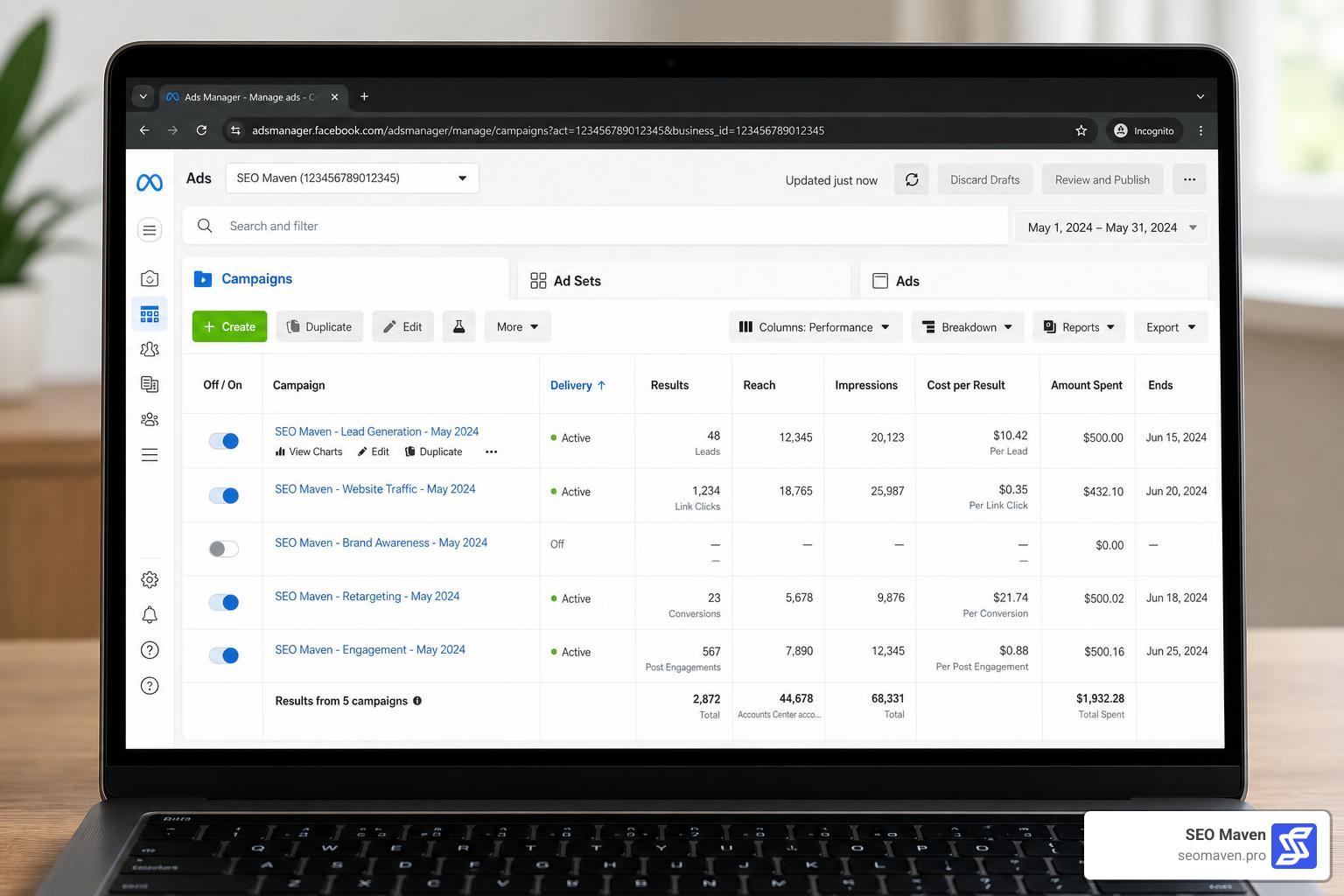
To help you navigate this layout, Meta provides 135 tools for Facebook and Instagram ad campaign management. You can use the search bar and advanced filtering options to quickly find specific campaigns. We also recommend customizing your reporting columns. By saving a custom column preset that highlights your most important metrics—such as Cost Per Acquisition (CPA), Click-Through Rate (CTR), and Return on Ad Spend (ROAS)—you can bypass the visual noise and focus on what truly drives revenue.
Core Features and Campaign Architecture
To build a highly profitable paid social engine, you must understand how Meta’s campaign architecture works. Every successful campaign relies on a clear hierarchy, combining strong strategic objectives with precise targeting and compelling creative execution.
Campaign Objectives and Structure
In Meta’s modern ecosystem, campaign objectives are simplified into six primary outcomes. Choosing the right objective is the single most important decision you will make, because Meta’s machine-learning algorithm optimizes your delivery based on this selection. If you choose “Traffic,” Meta will find people who love clicking links but might never buy. If you want sales, you must tell the system directly.
The primary campaign objectives include:
- OUTCOME_SALES: Optimized for conversions, catalog sales, and purchases.
- OUTCOME_LEADS: Designed to collect user information via instant forms, Messenger chats, or landing page sign-ups.
- OUTCOME_TRAFFIC: Best for sending users to a specific URL, blog post, or landing page.
- OUTCOME_AWARENESS: Focuses on maximizing impressions, video views, and brand recall.
- OUTCOME_ENGAGEMENT: Perfect for securing post likes, comments, shares, event responses, or page messages.
- OUTCOMEAPPPROMOTION: Tailored specifically to drive mobile app installs and in-app events.
Additionally, you must declare if your business falls into any Special Ad Categories (such as Housing, Employment, Credit, or Issues/Elections/Politics). Declaring these is legally required and restricts certain targeting options to prevent discrimination.
If you are looking to maximize your visual impact, particularly on mobile-first platforms, take a look at our playbook on How to Win at Instagram Advertising Using Meta.
Advanced Targeting and Audience Tools
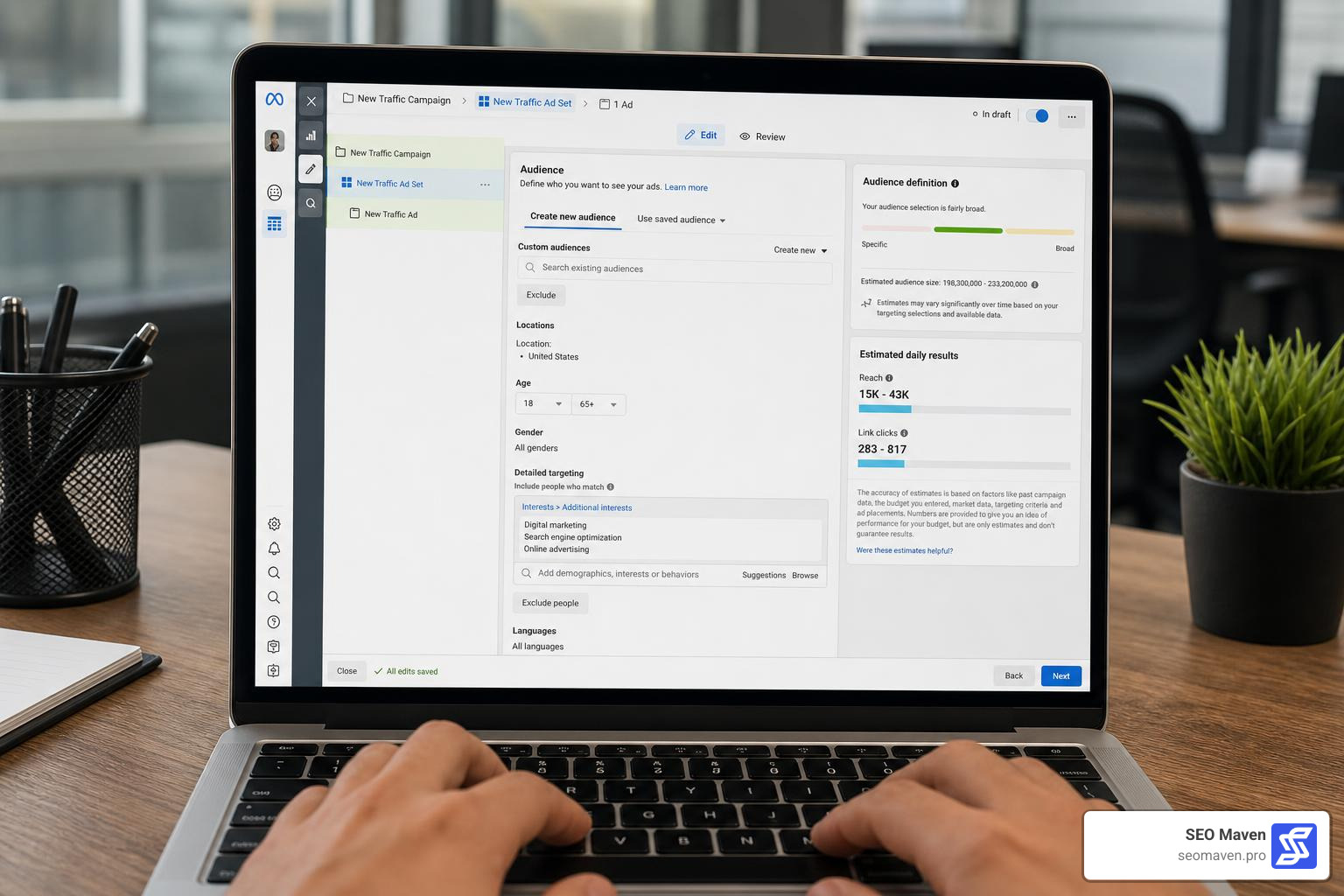
Once your campaign objective is locked in, you move to the ad set level to define who sees your ads. Meta’s targeting capabilities are incredibly sophisticated, allowing you to segment audiences using three primary methods:
- Custom Audiences: These are built using your warm, first-party data. You can upload customer email lists, target past website visitors tracked by your pixel, or build audiences of users who have engaged with your Instagram profile or Facebook page.
- Lookalike Audiences: Meta analyzes your source Custom Audience (like your highest-value buyers) and uses its deep data network to find the top 1% to 10% of users in a target country who behave most like your existing customers.
- Detailed Targeting: This allows you to reach people based on demographics, interests, and specific online behaviors.
However, navigating targeting in 2026 requires understanding modern privacy shifts. Ever since major tracking updates and browser-level changes rolled out, relying purely on old-school interest targeting has become less effective. To stay ahead of these shifts, we highly recommend reading up on the latest developments in Meta 2025 Data Restrictions to learn how to keep your targeting accurate and compliant.
Advanced Optimization and Automation
As your ad spend grows, manual adjustments can become incredibly time-consuming. To scale your campaigns efficiently without babysitting them 24/7, you need to leverage Meta’s built-in automation, machine learning, and advanced developer tools.
Scaling Budgets and Automated Rules
When it comes to budget management, Meta offers two primary options:
- Daily Budgets: A set limit on what Meta can spend each day per ad set.
- Lifetime Budgets: A total amount allocated for the entire duration of a campaign’s schedule, allowing Meta’s algorithm to spend more on high-performance days and less on slower ones.
For most businesses, we recommend utilizing Advantage+ Budget (formerly known as Campaign Budget Optimization or CBO). Advantage+ automatically distributes your budget across your active ad sets in real-time, directing the most spend to the ad sets that are generating the cheapest results.
To protect your budget from sudden performance dips, you can set up Automated Rules. For example, you can create a rule that says: “If an ad set spends more than $100 today and the Cost Per Acquisition (CPA) is greater than $35, pause the ad set immediately.” This keeps your spend efficient even when you are away from your computer.
Additionally, choosing the right bid strategy is crucial. While “Lowest Cost” (maximizing volume for your budget) is the default, advanced advertisers often use a Cost Cap to tell Meta the maximum average CPA they are willing to pay, ensuring the system never overspends on expensive conversions.
Programmatic Meta Ads Management and Developer Tools
For software developers, technical marketers, and AI-driven workflows, Meta’s platform can be managed programmatically. The Meta Marketing API supports advanced automation, and the developer community has built excellent tools to streamline these operations.
For example, the Model Context Protocol (MCP) allows AI agents to interact directly with the Meta Ads API. You can explore these programmatic tools and servers in detail:
- Refer to the official Meta Ads MCP Tools Reference to see how 24 distinct management tools can be programmatically run.
- Integrate AI workflows using the Pinkfish Meta Ads Manager API reference.
- Utilize the mikusnuz Meta Ads MCP repository, which exposes 135 tools for managing campaigns, budgets, and catalogs.
- Set up the Meta Ads MCP Server to connect tools like Claude Desktop to your ad accounts.
- Use the command-line tool meta-ads-cli to manage campaigns, run bulk pause/activate commands, and export performance metrics as structured JSON data.
These programmatic systems allow modern teams to automate reporting, build custom dashboards, and let AI agents handle routine optimization tasks seamlessly.
To see how we combine these advanced automated systems with human creative strategy, take a look at our comprehensive Meta Ads Agency Playbook 2026.
Below is a comparison of how manual campaign management stacks up against AI-driven and automated approaches:
| Feature/Task | Manual Campaign Management | AI & Automated Campaign Management |
|---|---|---|
| Bidding & Budgeting | Manual adjustments based on daily performance reviews. | Real-time bidding optimizations and Advantage+ budget allocation. |
| Creative Testing | Manually creating and swapping ad creatives. | Dynamic Creative testing of multiple headlines, images, and videos. |
| Audience Targeting | Manually building and updating specific interest lists. | Machine learning-based predictive targeting and automatic lookalikes. |
| Optimization Speed | Done daily or weekly by a human media buyer. | Continuous, real-time adjustments based on instant data signals. |
| Strategic Oversight | High control, cultural nuance, and creative direction. | Relies on data inputs; lacks human context and emotional appeal. |
Overcoming Common Challenges and Pitfalls
Even the most carefully planned campaigns will occasionally hit speed bumps. The key to long-term success is knowing how to navigate these challenges when they arise.
Troubleshooting Account Restrictions and Billing Issues
If you spend enough time advertising on Meta, you will eventually face a policy warning or an account restriction. Meta’s automated compliance systems are highly sensitive and can flag accounts for seemingly minor reasons.
Common pitfalls include:
- Ad Policy Non-Compliance: Avoid overly sensational headlines, unrealistic “before and after” claims, or direct call-outs to personal attributes (e.g., “Are you struggling with back pain?” should be reframed as “Discover simple exercises to support back health”).
- Payment Failures and Billing Glitches: If your credit card is declined or Meta charges a duplicate fee by mistake, the system may flag your account as a security risk.
- Identity Verification: Meta frequently requires advertisers to upload government-issued IDs or complete two-factor authentication to verify their identity.
If your account is restricted, do not panic. Navigate to the “Account Quality” dashboard, review the specific policy violation, and submit a formal appeal. If the automated system rejects your appeal, submit a support ticket to speak with a human representative.
For a deeper dive into navigating these platform hurdles without losing your cool, check out our comparative guide, Meta Business Ad Manager vs the World.
Mobile App vs. Desktop Meta Ads Management
Many business owners wonder if they can manage their campaigns entirely from their phones. The short answer is: yes, but with limitations.
The Meta Ads Manager mobile app (available on iOS at a download size of 106.9 MB and requiring iOS 15.1 or later, as well as on Google Play) is a fantastic tool for remote monitoring. It supports 33 languages, offers real-time alerts, and features a side-by-side comparison tool to quickly review campaign performance on the go. You can easily pause underperforming ads, adjust budgets, or extend campaign schedules from your phone.
However, the desktop version remains the definitive platform for building complex campaigns. Detailed audience research, catalog syncing, Conversions API setup, and advanced reporting are far easier and more precise on a desktop screen. We recommend using the desktop interface for initial creation and deep strategic work, and the mobile app for daily check-ins and emergency adjustments.
Frequently Asked Questions about Meta Ads
What is the difference between Meta Ads Manager and Meta Business Suite?
The Meta Business Suite is an all-in-one management tool designed to handle your organic presence across Facebook and Instagram. It is where you schedule organic posts, reply to customer messages, and view general page insights. Meta Ads Manager, on the other hand, is a specialized workspace built strictly for paid advertising. It houses your campaign structures, targeting tools, and detailed paid performance metrics.
How does the Meta Pixel track conversions in 2026?
The traditional Meta Pixel relies on browser-based cookies, which are increasingly blocked by modern web browsers and privacy settings. To ensure accurate tracking in 2026, businesses must implement a hybrid approach combining the Meta Pixel with the Conversions API (CAPI). This server-side tracking system sends conversion events directly from your website’s server to Meta, bypassing browser limitations and providing cleaner, more reliable data for your campaigns.
What are the privacy practices of the Meta Ads Manager app?
According to the App Store and Google Play privacy disclosures, the Meta Ads Manager app collects certain data types linked to your digital identity—such as contact info, usage data, and purchase history—to optimize app performance and ensure secure payment processing. The app operates under strict data encryption protocols, requires iOS 15.1 or later on Apple devices, and allows users to request data deletion through their account settings.
Conclusion
Mastering meta ads management is one of the most effective ways to drive consistent, scalable growth for your business. From choosing the right campaign objective to setting up automated rules and navigating programmatic developer tools, the platform offers everything you need to turn your marketing budget into measurable ROI.
However, running profitable campaigns requires continuous testing, creative production, and technical optimization. As a boutique digital marketing agency based in South Florida, we specialize in helping small businesses in Hollywood FL, Fort Lauderdale FL, Miami FL, and Aventura FL achieve maximum ROI with streamlined, highly efficient ad campaigns.
We handle the technical setups, the creative testing, and the daily optimizations so you can focus on running your business.
Ready to scale your paid advertising and stop wasting ad spend? Let us build a high-performing advertising engine for your business. Partner with SEO Maven for Meta Ads Management today!