Is an AI Chatbot for Your Website Really Worth It?
Quick answer: Yes — an AI chatbot for website use is worth it for most small businesses. Here’s why at a glance:
| What It Does | Why It Matters |
|---|---|
| Answers questions 24/7 | No more missed leads after hours |
| Captures visitor contact info | Turns browsers into buyers |
| Handles repetitive support questions | Frees up your time and cuts costs |
| Responds in seconds | Beats the average 6-hour email reply time |
| Works on WordPress, Shopify, and more | No developer needed |
Your website gets visitors. But most of them leave without ever talking to you.
That’s the problem an AI chatbot for a website solves. Instead of letting potential customers click away, a chatbot greets them instantly, answers their questions, and — when done right — turns them into leads or buyers.
This isn’t the clunky, scripted chatbot of five years ago. Today’s AI-powered chatbots understand natural language, learn from your content, and hold real conversations. Businesses using them have reported cutting support costs by 60%, automating 85% of routine inquiries, and capturing thousands of qualified leads — all without adding headcount.
If you’re a small business owner in South Florida trying to get more out of your website with limited time and budget, this guide is for you.
I’m Fernando Larez, a marketing director and business owner with hands-on experience helping brands implement AI chatbots for their websites as part of broader digital growth strategies — from lead generation to SEO and conversion optimization. In the sections below, I’ll walk you through everything you need to know to decide if this technology is right for your business.
What is an ai chatbot for website and How Does It Work?
To understand why an AI chatbot for website deployment is such a game-changer, we first have to look at how the technology has evolved.
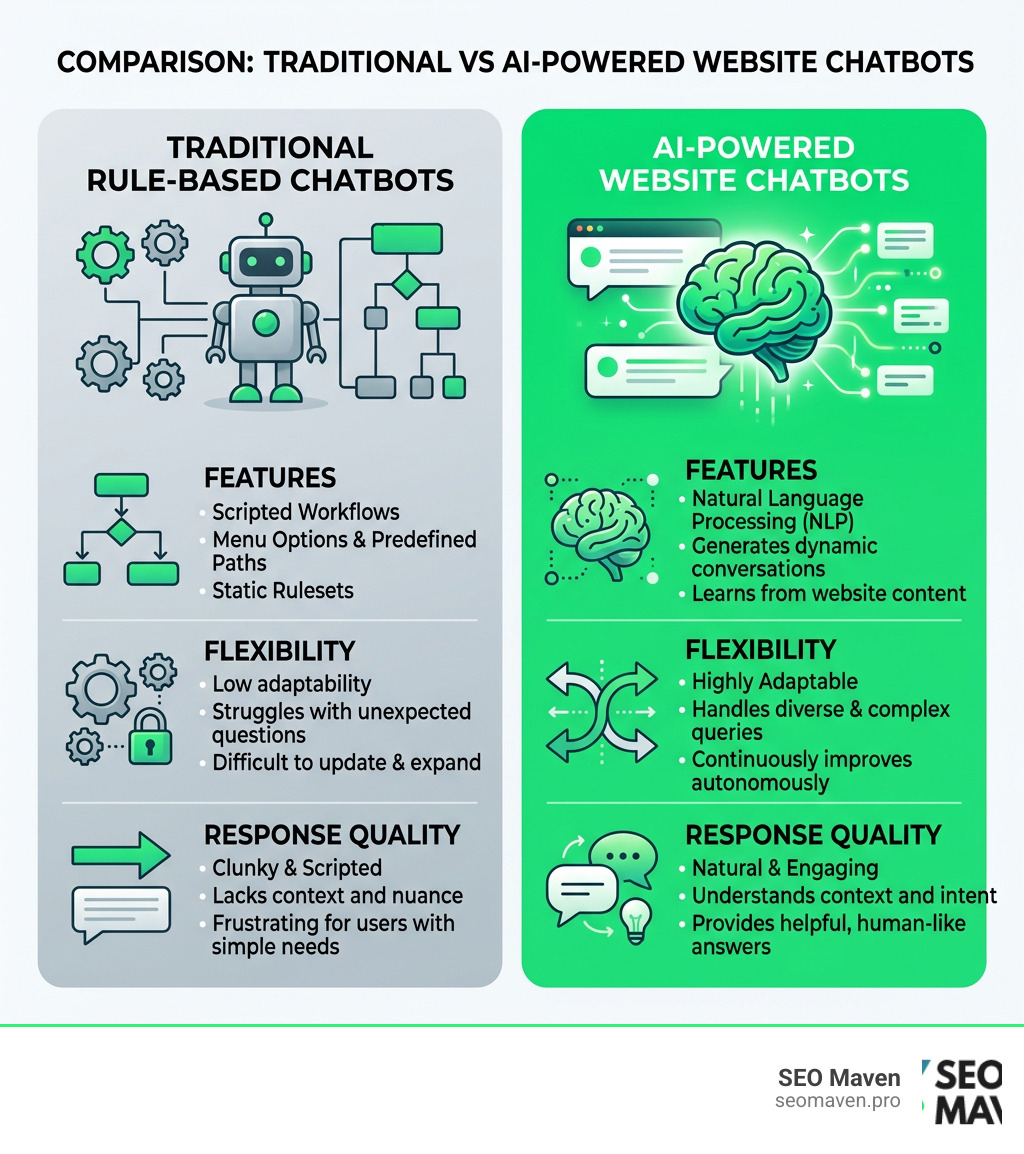
Traditional chatbots are essentially digital “choose-your-own-adventure” trees. They rely on pre-programmed rules and rigid scripts. If a customer types a question that doesn’t exactly match the script, the bot breaks, leaving the user frustrated.
Modern AI website chatbots, however, are powered by advanced Natural Language Processing (NLP), Natural Language Understanding (NLU), and Large Language Models (LLMs). Instead of matching keywords to static scripts, they interpret the context and intent behind a user’s question, allowing them to carry on fluid, human-like conversations.
The magic that makes these bots safe and accurate for business use is a technology called Retrieval-Augmented Generation (RAG). Instead of letting the LLM guess or “hallucinate” answers based on the entire internet, RAG grounds the chatbot. It forces the AI to search a specific, closed knowledge base—such as your website content, product catalogs, or uploaded PDFs—before generating a response.
This is highly relevant to modern web architecture. As we discuss in our guide on AI on web design, integrating intelligent, conversational layers directly into your user interface is no longer a futuristic concept; it is a standard design expectation.
For businesses that prefer complete control over their infrastructure, you can even deploy a self-hosted, open-source solution. Developers often utilize tools like the open-source RAG chatbot framework to build custom, highly secure assistants that run without recurring SaaS fees.
To make this technology practical for everyday life, organizations throughout Florida are adopting these tools to streamline public access. For instance, the City of Fort Lauderdale initiative demonstrates how municipalities use conversational AI to help residents navigate public services. Similarly, educational institutions like the University of Florida leverage the NaviGator – AI | University of Florida portal to support faculty and students with real-time, AI-driven guidance.
| Feature | Traditional Rule-Based Chatbots | AI-Powered Website Chatbots |
|---|---|---|
| Technology | Fixed decision trees & keyword matching | LLMs, NLP, NLU, and RAG |
| Understanding | Requires exact keyword matches | Grasps context, intent, and typos |
| Setup Effort | High (must map out every possible flow) | Low (reads your existing website and documents) |
| Tone & Style | Robotic and repetitive | Natural, conversational, and brand-aligned |
| Maintenance | Manual updates required for every change | Automatically updates when your content changes |
Key Benefits and Features of an AI Website Chatbot
If you are running a business in South Florida, you know that speed is everything. Customers do not want to wait six hours for an email reply when they are ready to make a decision right now. Implementing an AI chatbot for website visitors delivers immediate, compounding benefits across your entire operation.
- 24/7 Availability: Your physical office or support team might close at 5:00 PM, but your website never does. An AI chatbot acts as your tireless night-shift worker, answering product questions, scheduling consultations, and capturing leads while you sleep.
- Dramatic Cost Reduction: By automating up to 85% of repetitive, routine inquiries (such as “Where is my order?” or “What are your hours?”), businesses can reduce overall support costs by up to 60%.
- Instant Response Times: Instead of leaving a lead waiting in a queue, an AI chatbot responds in under 30 seconds. This drastically reduces bounce rates and keeps prospects engaged.
- Seamless Scalability: Whether you have ten visitors a day or ten thousand, an AI chatbot can handle multiple conversations simultaneously without breaking a sweat or requiring you to hire more staff.
These benefits directly support your primary goal: turning traffic into revenue. When you focus on how to design a website that actually makes money, you realize that reducing friction is the most effective way to boost conversions. An AI chatbot acts as an interactive guide, steering users toward high-value actions.

Furthermore, the rise of conversational AI has fundamentally changed how people find information online. According to recent data from SparkToro, roughly 80% of searches now end without a click, as users get direct answers from AI search engines. Because of this shift, businesses must adapt to Answer Engine Optimization (AEO) and Generative Engine Optimization (GEO).
When you optimize your content to be easily parsed by AI models, you don’t just win SEO referrals; you also build a cleaner, more structured knowledge base that feeds your own website’s chatbot. This synergy highlights why high-quality content is so critical. Whether you are figuring out how to master content creation in marketing or evaluating if is agency content creation actually worth the hype, clean, authoritative content is the fuel that makes both your SEO and your on-site AI chatbot succeed.
Customizing Your ai chatbot for website Branding
An AI chatbot shouldn’t feel like a generic, third-party add-on slapped onto your page. To build trust, it must look, speak, and act like a natural extension of your brand.
Modern chatbot builders give you deep control over the visual identity and conversational style of your assistant. You can customize the widget’s brand colors, upload a custom avatar (like a friendly illustration or a photo of a team member), and write a personalized greeting message that aligns with your brand voice. For advanced developers, platforms allow custom CSS overrides to match your exact site layout.
This level of customization is a core tenet of user-centric design. A cohesive, accessible interface ensures that visitors feel comfortable interacting with the bot.
For instance, solutions like the Arahi AI chat embed allow you to drop highly accessible, WCAG 2.1 AA-compliant widgets onto any surface with a single snippet. Similarly, you can configure detailed settings using frameworks outlined in the Website Widget – Onyx Documentation or implement distinct interaction types using the Add an alby Experience to your site | alby guidelines, choosing between predictive prompts, guided questionnaires, or freeform chats.
Lead Capture and Appointment Scheduling via ai chatbot for website
An AI chatbot for website use shouldn’t just answer questions—it should actively grow your business. One of its most powerful use cases is automated lead generation and scheduling.
Instead of forcing users to fill out long, boring contact forms, the chatbot can gather information contextually during a natural conversation.
To prevent spam and ensure you only pass high-quality data to your sales team, advanced systems use One-Time Password (OTP) verification. The bot asks for a phone number or email, sends a quick verification code, and confirms the lead is real before saving it.
Additionally, these bots integrate directly with your calendars (like Google Calendar or Microsoft Outlook) and CRM platforms. If a visitor wants to book a consultation, the chatbot can display open timeslots inline and secure the booking right inside the chat window.
Using a multi-channel tool like the Hyperleap AI multi-channel chatbot allows you to sync these workflows across your website, WhatsApp, Instagram, and Facebook Messenger. This ensures that whether a client reaches out on your site while sitting in an office in Miami or sends a DM on Instagram from Aventura, they receive the same instant, lead-qualifying experience.
Real-world case studies show the power of these integrations. For example, travel and hospitality brands have captured over 3,300 verified leads in 90 days, achieved a 4x increase in qualified leads, and driven a 108% increase in direct bookings simply by letting an AI chatbot handle the initial discovery and scheduling process.
How to Install, Secure, and Set Up an AI Chatbot
One of the biggest misconceptions about adding an AI chatbot for website platforms is that you need a team of developers to build it. In reality, modern software-as-a-service (SaaS) platforms make deployment incredibly simple.
For most platforms—whether you are running WordPress, Shopify, Wix, Squarespace, Webflow, or a custom HTML site—the installation process takes less than five minutes. It generally follows a simple four-step workflow:
- Create Your Agent: Sign up for a platform and define your chatbot’s role, tone, and system instructions.
- Upload Your Knowledge Base: Paste your website URL so the AI can crawl your public pages, or upload documents like PDFs, CSVs, and text files.
- Customize the Design: Adjust the colors, avatar, and positioning to match your brand guidelines.
- Copy and Paste the Embed Code: Copy a single line of JavaScript (a script tag) and paste it before the closing
tag of your website’s HTML.

When selecting a tool, you’ll find various pricing models to fit your business size. Most SaaS platforms offer subscription tiers based on the number of active AI agents, message volume, or seat licenses, while some charge a flat monthly fee with unlimited messages. Alternatively, open-source models allow you to host the system on your own servers, trading a monthly software fee for self-managed hosting costs.
Security, Privacy, and Compliance
Because your chatbot will interact with real customers and collect personal details, data security is paramount. You must ensure your chatbot provider adheres to strict privacy standards:
- Compliance: The platform should comply with major privacy frameworks like GDPR and CCPA.
- Certifications: Look for enterprise-grade security certifications such as AICPA SOC 2.
- Data Encryption: Ensure all conversations and lead data are protected using 256-bit encryption both in transit and at rest.
- Rate Limiting & API Security: To prevent malicious actors from spamming your AI model (which can run up your API costs), the widget should have built-in rate limiting and secure, limited-scope API keys.
If you want a highly secure, easy-to-use option, platforms like the BuiltABot website chatbot software offer built-in GDPR/CCPA compliance, A+ security ratings, and asynchronous loading that won’t impact your site speed.
Furthermore, you should always include clear disclaimers to manage user expectations and meet legal obligations. For inspiration, you can look at the public Martin County Florida AI chatbot disclaimer, which outlines how public entities clarify the automated nature of AI responses and protect user data.
To see how other Florida organizations balance automation, service delivery, and compliance, you can explore the Piper AI ChatBot | City of Delray Beach, FL or review the educational resources provided in the LibGuides: AI Tools and Resources: LINK AI Chatbot directory by the University of South Florida. For a robust commercial solution that guides you through setting up legal consent checkmarks within the chat window, check out ChatBot® – The Best AI Chatbot Software for Your Website .
If you are looking for a local partner to design a secure, high-converting digital experience from scratch, our neighbors at MIAMI WEB AI | AI Studio — Websites, Apps & AI Tools in Days specialize in rapid, AI-integrated web development right here in South Florida.
Frequently Asked Questions about AI Website Chatbots
Will an AI chatbot slow down my website?
No, not if you use a modern, well-designed platform. High-quality chatbot widgets are built to load asynchronously. This means your website’s main content (text, images, and layout) loads first, and the chatbot script loads quietly in the background. Because it does not block the rendering of your page, it will not negatively impact your core Web Vitals, page speed scores, or search engine optimization (SEO).
How does an AI chatbot learn about my business?
Your chatbot learns by reading the data you provide. You do not need to write code or train a machine learning model from scratch. You simply provide:
- Your Website URL: The bot crawls your public pages to learn about your services, pricing, and history.
- Document Uploads: You can upload PDFs, Word documents, text files, or spreadsheets containing internal FAQs, product manuals, or shipping policies.
- Q&A Pairs: You can manually type in specific questions and exact answers for topics that require precise handling.
The chatbot’s RAG system searches these documents in real-time to construct accurate answers to user queries.
When should an AI chatbot escalate to a human agent?
While AI can handle the vast majority of customer inquiries, there will always be situations that require a human touch. Your chatbot should escalate the conversation when:
- Confidence Drops: The AI cannot find a reliable answer in your knowledge base.
- Complex Issues: The visitor has a highly specific, emotional, or technical problem.
- High-Value Leads: A VIP client or large account requests to speak with a representative.
- Direct Requests: The user explicitly types “speak to a human.”
Most modern systems handle this by seamlessly routing the conversation—along with the full chat transcript—to your team’s live chat dashboard, Slack channel, or help desk (such as Zendesk, HelpScout, or Intercom) so a human can step in without missing a beat.
Conclusion
Implementing an AI chatbot for website engagement is no longer a luxury reserved for massive tech companies. It is an accessible, highly efficient tool that helps small businesses maximize their digital return on investment (ROI). By providing instant answers, capturing verified leads, and operating around the clock, an AI chatbot ensures you never miss an opportunity to connect with a potential customer.
At SEO Maven, we specialize in helping small businesses in Hollywood, Fort Lauderdale, Miami, and Aventura achieve more with less. As a boutique digital marketing agency based in South Florida, we focus on high-ROI strategies—from technical SEO and content marketing to user-centric web design—that turn casual website traffic into loyal clients.
Ready to optimize your website for maximum conversions and search visibility? Explore our digital marketing services or reach out to our team today to discuss how we can help you scale your business.