What is Meta Ad Manager and Why Does Your Business Need It?
At its core, the meta ad manager is the central nervous system for all your paid social efforts. Its primary purpose is to provide a unified interface where businesses can design, launch, and monitor advertisements across the entire Meta ecosystem. This includes Facebook, Instagram, Messenger, WhatsApp, and the Audience Network (which places your ads on high-quality third-party apps and websites).
Why do we recommend it to our South Florida clients over simply “boosting” a post? Because the meta ad manager offers surgical precision. While a boosted post is a quick way to get likes, the Ads Manager allows you to optimize for specific business goals—like website conversions, app installs, or lead generation.
Cross-Platform Reach and Integration
One of the biggest strengths of this tool is its ability to manage multiple platforms from one seat. You don’t need a separate account for Instagram or Messenger. You can create a single campaign and tell Meta to find your audience wherever they happen to be scrolling. This cross-app communication is vital for modern marketing, especially with the rise of Twitter for Small Business Marketing and other platforms competing for attention.
Data Privacy and Security
In an era of increasing digital scrutiny, Meta has implemented robust privacy and security practices. Data is encrypted in transit, and users have the ability to request data deletion. However, it is important to stay informed about Meta 2025 Data Restrictions to understand how evolving privacy laws might affect your targeting capabilities. For more detailed official information, you can always visit the About Meta Ads Manager | Meta Business Help Center.
Mastering the Hierarchy: Campaigns, Ad Sets, and Ads
To navigate the meta ad manager without losing your mind, you must understand its three-tier “Russian Doll” structure. Everything lives inside something else.

1. The Campaign Level
Think of the Campaign as your “Big Goal.” This is where you decide what you want to achieve. Are you looking for brand awareness, website traffic, or sales? You choose one objective per campaign. This is also where you can enable Advantage+ campaign budget optimization, which lets Meta’s AI distribute your spend to the best-performing areas automatically.
2. The Ad Set Level
This is the “Who, Where, and When” level. Within an ad set, you define:
- Audience Targeting: Age, gender, location (like Miami or Fort Lauderdale), and interests.
- Placements: Do you want your ads in Instagram Stories, Facebook Feed, or both?
- Budgeting and Scheduling: Set your daily or lifetime budget and choose when the ads should start and stop.
3. The Ad Level
This is the “What” level—the actual creative your customers see. Here, you upload your images or videos, write your headlines, and choose your call-to-action (CTA) buttons. You can experiment with various ad formats, such as:
- Single Image or Video: Great for a clear, singular message.
- Carousel: Perfect for showing multiple products or a step-by-step process.
- Collection: A mobile-first format that allows users to browse products directly within the ad.
For a deep dive into building these out, check out how to Create ad campaigns in Meta Ads Manager | Meta Business Help Center.
Key Features to Optimize Your Meta Ad Manager Performance
The meta ad manager is packed with features designed to make you look like a pro, even if you’re just starting out. One of the most significant shifts we’ve seen recently is the move toward AI-driven automation.
Manual Targeting vs. Advantage+ AI
| Feature | Manual Targeting | Advantage+ (AI) |
|---|---|---|
| Control | High – You pick every interest and demographic | Low – Meta’s AI finds the audience for you |
| Effort | Time-consuming research required | Fast setup with minimal input |
| Optimization | Relies on your manual adjustments | Real-time machine learning optimization |
| Best For | Niche audiences with very specific needs | Scaling and finding new customers you missed |
Real-Time Insights and Opportunity Score
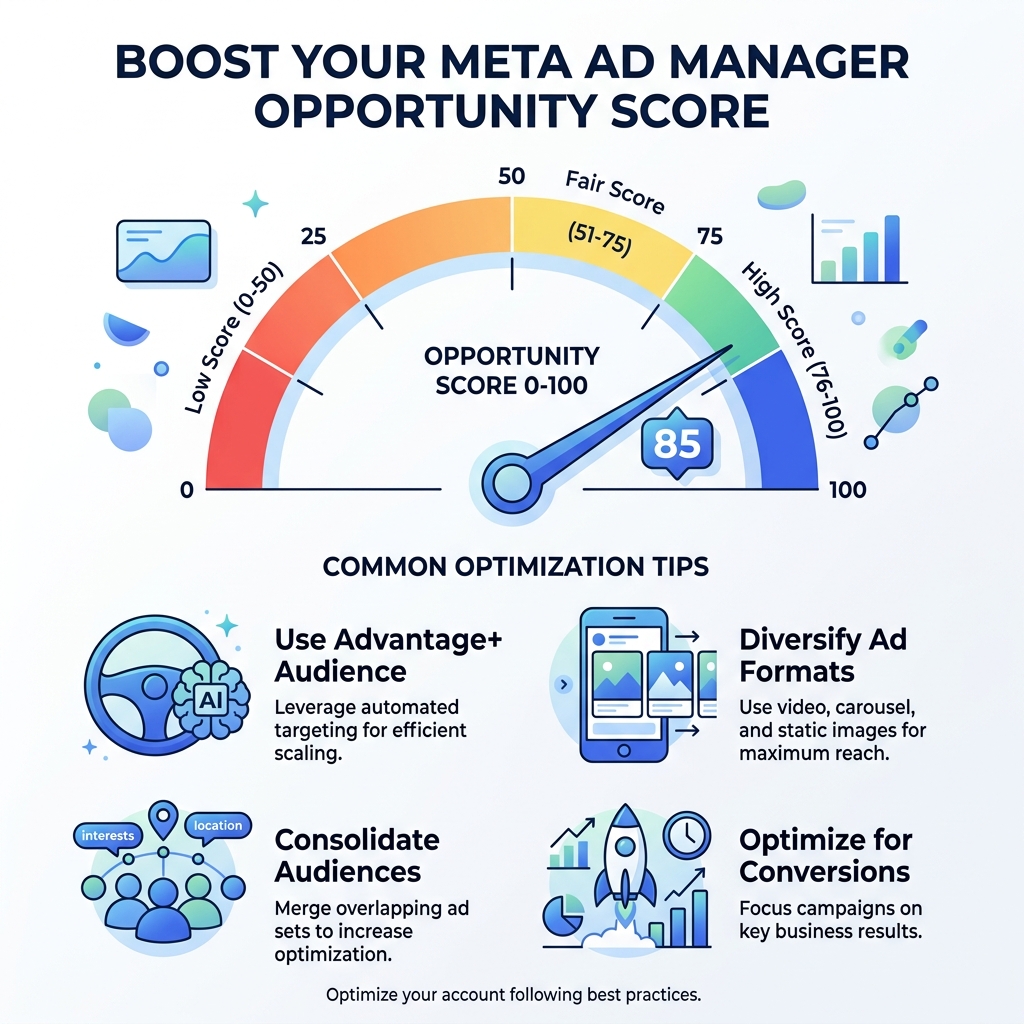
Meta provides an “Opportunity Score” on a scale of 0 to 100. This isn’t just a vanity metric; it represents how well your account is following Meta’s best practices. If your score is low, the “Actions” column will provide specific recommendations to help you raise it.
We often discuss these optimization strategies in our Meta Ads Agency Playbook 2026, focusing on how small businesses can leverage these tools for maximum ROI. You can access the tool itself at Meta Ads Manager to see your current score.
Getting Started: Setting Up Your Account and Payments
Before you can start chasing leads in Aventura or Hollywood, FL, you need to get your house in order.

- Create an Ad Account: You’ll need a personal Facebook profile to start, but we highly recommend setting up a Meta Business Account to keep your personal and professional lives separate.
- Assign Roles: If you’re working with a team or an agency like ours, you can assign different levels of access (Admin, Advertiser, Analyst) without sharing your password.
- Set Up Payment Methods: Meta accepts major credit cards, PayPal, and in some regions, direct bank transfers. Be sure to set a “Business Spend Limit” to ensure you never accidentally spend more than you intended.
- Billing Thresholds: Meta typically bills you when you reach a certain spending limit (threshold) or at the end of the month. Understanding this prevents “sticker shock” when you see a charge on your statement.
For a step-by-step walkthrough, the Facebook Ads Setup Guide is an excellent resource. If the technical setup feels overwhelming, our Marketing Services can help get you over the finish line.
Managing on the Go: The Meta Ad Manager Mobile App
Business doesn’t just happen at a desk. Whether you’re at a meeting in Miami or grabbing coffee in Fort Lauderdale, you need to know how your ads are performing. The Meta Ads Manager mobile app (available on iOS and Android) is a surprisingly powerful companion to the desktop version.
Mobile Functionality
- Real-Time Alerts: Get notified immediately if an ad is approved or if a payment fails.
- Campaign Toggling: Turn campaigns on or off with a single swipe. This is a lifesaver if you notice a mistake or an offer expires.
- Side-by-Side Comparisons: The app allows you to compare two campaigns or ad sets to see which one is winning the ROI battle.
- Account Switching: Easily jump between different Pages and ad accounts if you manage multiple businesses.
With over 10 million downloads on Google Play and a solid 4.5-star rating on the App Store, the app is a reliable tool for on-the-go management. It supports 33 languages, making it accessible for diverse business owners across the US and beyond. You can find more tips on mobile strategy in our Social Media Category.
Troubleshooting Common Challenges and Finding Support
Let’s be honest: sometimes the meta ad manager can be frustrating. Users often report challenges regarding customer support and billing issues.
Common Headaches
- Billing Failures: This often happens if your bank flags a transaction as fraud or if you hit your credit limit. Always have a backup payment method on file.
- Account Hacking: This is a serious issue. Enable Two-Factor Authentication (2FA) immediately to protect your business assets.
- Restricted Accounts: Meta’s automated bots sometimes flag accounts by mistake. If this happens, don’t panic. You can usually request a review through the Account Quality section.
Finding Help
When things go wrong, human support can be hard to find. Meta relies heavily on the Meta Business Help Center and Meta Blueprint (their free e-learning platform). While there is an email support option (android-support@fb.com for app issues), we recommend starting with the troubleshooting guides in the Help Center. For those who want a partner to handle these headaches for them, working with a Meta Ads Agency can save you hours of frustration.
Frequently Asked Questions about Meta Ad Manager
How do I contact Meta Ad Manager support?
Direct human support is primarily available through the “Help” icon within the Ads Manager dashboard. Depending on your spend and account status, you may have access to live chat support. Otherwise, the Help Center and community forums are your best bet. There is no public phone support number for Meta ads, so be wary of scams claiming otherwise.
Can I run ads on WhatsApp through Meta Ad Manager?
Yes! You can create “Click-to-WhatsApp” ads. When a user clicks your ad on Facebook or Instagram, it opens a pre-filled chat in WhatsApp, allowing you to talk to customers directly. This is an incredible tool for high-touch businesses like real estate or consulting.
What is a good Opportunity Score in Meta Ad Manager?
While 100 is the goal, don’t obsess over it. A score above 70 is generally considered healthy. The most important thing is that your ads are meeting your actual business goals (like sales or leads), regardless of what the “score” says. Use the recommendations as a guide, not a set of unbreakable rules.
Conclusion
The meta ad manager is a powerhouse tool that can transform a small business into a local leader. By understanding the hierarchy of campaigns, leveraging AI features like Advantage+, and staying on top of your performance via the mobile app, you can reach your audience in South Florida and beyond with incredible efficiency.
At SEO Maven, we specialize in helping businesses achieve more with less. As a boutique agency focused on SEO and high-ROI content, we understand the nuances of the digital landscape in Hollywood, Miami, and Fort Lauderdale. If you’re ready to stop crying over your dashboard and start seeing results, we’re here to help. Explore our insights on Digital Billboards or see how we can elevate your brand as your Meta Ads Agency. Let’s grow your business together.