A real estate office in Hollywood can have hundreds of listing photos on its website: bright kitchens, pool decks, balconies with a sliver of ocean view. Every one of them was shot with care. And to a search engine, many of them are close to invisible. That’s where real estate photo alt text comes in. It’s a short line of text that tells Google, and anyone using a screen reader, what a picture actually shows.
I’m Fernando Larez, owner of SEO MAVEN in Hollywood, FL. In this guide I’ll explain why listing photos so often go unseen in search, and walk through five simple fixes South Florida agents, brokers and property managers can apply one listing at a time. No tricks, no keyword stuffing, just what Google and accessibility experts actually recommend.
Why Google can’t “see” your listing photos
People judge a property in seconds by its pictures. Search engines work differently. Google does use computer vision, but its own image SEO best practices explain that it also leans on the text around an image to understand it: the file name, the alt text, captions and the content of the page where the photo appears.
Now picture a typical listing upload. The files come straight off the camera as IMG_4471.jpg and DSC_0082.jpg. The alt attribute is empty. The page title is the template default, and there’s no meta description. Google has very little to work with, so it guesses. Sometimes the snippet in search results ends up showing a cookie notice or a line from the navigation menu instead of what makes the property special.
Here’s the turning point: your best marketing asset may be the part of your website search engines understand least.
What real estate photo alt text is, and who it helps
Alt text (short for “alternative text”) is an attribute in your page’s HTML that describes an image in words. Visitors don’t see it on the page unless the image fails to load, but it does real work for two audiences.
- People using screen readers. A buyer with low vision browsing your listings hears the alt text read aloud. The W3C Web Accessibility Initiative images tutorial explains that informative images need a text alternative that conveys the same information the picture does.
- Search engines. Google calls alt text the most important attribute when it comes to image metadata, and uses it together with computer vision and the page content to understand what a photo shows.
So writing good image descriptions isn’t a trick for search engines. It’s a better experience for real people that also happens to help your photos get understood in Google Images and regular results. That’s the kind of white-hat work Google Search Essentials is built around.
5 simple fixes, one listing at a time
You don’t need to overhaul your whole site in a weekend. Start with your newest or most important listings and work backward.
1. Rename image files before you upload
Google says file names give it “very light clues” about an image, and it specifically suggests short, descriptive names over generic ones like IMG00023.JPG. For a listing, that might mean hollywood-condo-pool-deck.jpg or three-bedroom-home-kitchen-island.jpg instead of a camera number. Use hyphens between words and keep it brief. It takes a few seconds per photo and it’s much harder to fix after the images are live.
2. Write alt text that describes what’s actually in the photo
This is the heart of it. Describe the picture plainly, the way you’d explain it to a client on the phone. Focus on what matters for that room or space: the feature, the material, the view.
- Missing: no alt attribute at all.
- Too thin: “pool”
- Stuffed: “Hollywood FL real estate homes for sale Hollywood condo realtor Hollywood pool”
- Helpful: “Community pool with stepping stones, a shaded pergola and tropical landscaping with palm trees”
Google’s guidance is direct on that third example: filling alt attributes with keywords creates a poor experience and may cause your site to be seen as spam. Keep each description to a sentence, mention a neighborhood only when it’s genuinely part of what’s shown (an ocean view from a Hollywood Beach balcony, for example), and don’t repeat the same line on every photo in a gallery.
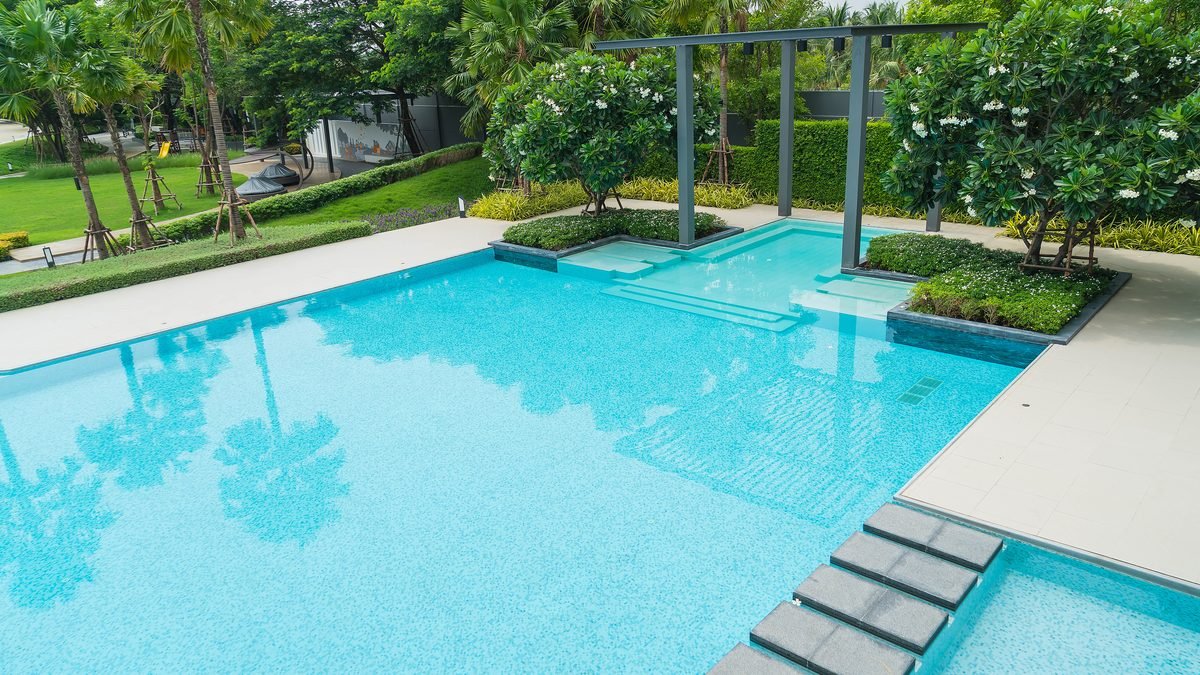
Purely decorative images, like a background texture or divider, are different. The W3C’s alt text decision tree explains when an empty alt attribute is the right choice so screen readers can skip them. Listing photos are almost never decorative, though. They’re the main content.
3. Give every listing page its own title
Your images live on pages, and Google looks at the whole page to understand them. A unique title for each listing or service page helps both. Include the property type, the neighborhood and what makes it stand out, for example “Two-Bedroom Waterfront Condo in Hollywood Beach.” Google’s title link guidelines recommend descriptive, concise titles and warn against vague or repetitive ones, which is exactly what happens when every listing shares one template title.
4. Add a meta description that makes people want to click
Write one or two clear sentences that summarize the listing or page. Google doesn’t always use your description, but its snippet guidelines say a good meta description can be shown when it describes the page more accurately than other text on it. That’s how you keep a cookie banner from becoming your first impression in search results.
5. Compress large photos so pages load fast
Listing photos are often exported at full camera resolution, and Google notes that images are often the largest contributor to overall page size. Heavy files slow pages down, especially on phones, which is where many buyers browse. Resize photos to the largest size your site actually displays, compress them with a tool like Squoosh, and consider modern formats such as WebP. Then check a listing page in PageSpeed Insights. The Learn Images course on web.dev goes deeper if your developer wants the details.
Mistakes to avoid
- Copying the same alt text onto every photo. Twenty images labeled “luxury home for sale” tell a screen reader user and Google nothing new about each room.
- Describing people instead of the property. Fair housing rules apply to all of your advertising, and that includes the words on your website. Keep descriptions about the home, its features and its views. NAR’s fair housing resources and HUD’s Fair Housing office are good places to review the principles with your team.
- Trusting auto-generated descriptions blindly. Some platforms and Ai tools can draft alt text for you. That can save time, but review every line. An Ai caption may miss what makes the property special or describe something that isn’t there.
- Putting key details only inside images. If your price, address or open house time only appears as text baked into a graphic, search engines and screen readers may miss it. Put it in real text on the page too.
- Forgetting older listings and team pages. Agent headshots, office photos and neighborhood guides deserve descriptions too.
Frequently asked questions
How long should alt text be?
There’s no official character limit from Google. Aim for one clear sentence that describes the photo. If you need more detail, use a caption or the listing description on the page.
Will alt text alone improve my rankings?
No single change guarantees better rankings, and anyone who promises that is overselling. Descriptive images, clear titles and fast pages help Google understand your listings and help visitors use them. They work best alongside a well-built site. Our guide on how to build a real estate website covers the foundation.
What about photos syndicated from the MLS?
IDX feeds and portals control their own markup, so focus on the pages you own: your featured listings, sold properties, neighborhood guides and service pages. That’s where you have full control.
Does this help my local search presence?
It supports it. Clear, accurate pages are part of the bigger local picture, along with your Google Business Profile and structured data. Our guide to local business schema explains another way to help Google understand your business.
How SEO MAVEN can help
If your team would rather sell homes than rename image files, we can help:
- SEO services that include image audits, page titles and meta descriptions, done the white-hat way.
- Web design & development so your listing pages load fast, look sharp on phones and are accessible to every visitor.
Want to keep learning? Browse the SEO MAVEN blog, including our guide to fixing an outdated website. And if you’d like a second set of eyes on how your listings show up in search, contact SEO MAVEN. We’re right here in Hollywood and happy to take a look.
Fernando Larez, Owner, SEO MAVEN, Hollywood, FL