Battle of the Builders: Which Is Better Wix or Squarespace for Your Business?
If you’re trying to decide which is better Wix or Squarespace, here’s the short answer:
| Wix | Squarespace | |
|---|---|---|
| Best for | Small businesses, flexibility, ecommerce | Creatives, portfolios, clean design |
| Ease of use | Good (more options = more decisions) | Excellent (faster for beginners) |
| Templates | 2,000+ (quantity) | 190+ (higher quality) |
| Ecommerce | Stronger (more apps, lower fees) | Good (cleaner but pricier) |
| Starting price | $17/month (free plan available) | $16/month (14-day trial only) |
| Overall rating | 4.8/5 | 4.5/5 |
Bottom line: Wix wins for most small businesses that need flexibility and growth tools. Squarespace wins if polished design is your top priority.
Picking the wrong website builder can cost you real money — and real customers. For a small business owner in South Florida trying to compete online, the platform you build on affects your SEO, your sales, and how much time you spend managing your site instead of running your business.
Both Wix and Squarespace promise to make building a professional website easy, with no coding required. But they take very different approaches. And those differences matter a lot depending on what you actually need.
Over 300 hours of hands-on testing across the web builder industry reveal that these two platforms are closely matched — but not equal. Knowing where they differ could save you from a colloquial switch later.
I’m Fernando Larez, a marketing professional and SEO strategist with experience helping South Florida businesses improve their online visibility and generate qualified leads. I’ve evaluated platforms like Wix and Squarespace through the lens of what actually drives growth — traffic, conversions, and ROI — making the question of which is better Wix or Squarespace one I’ve worked through with real clients. In this breakdown, I’ll walk you through exactly what each platform does well, so you can choose with confidence.
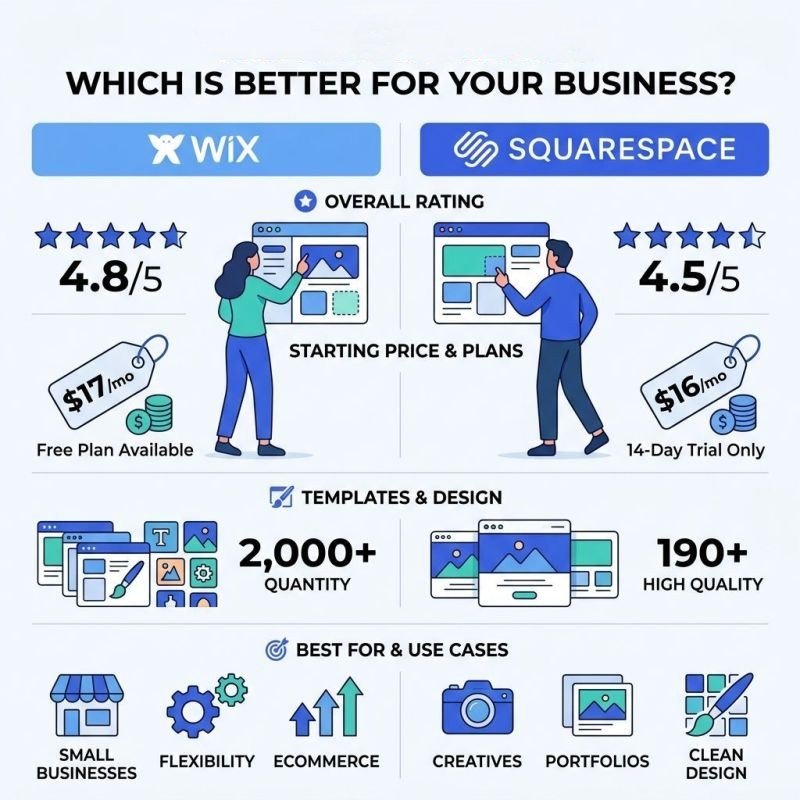
Wix vs Squarespace feature comparison infographic showing ratings, pricing, templates, and best use cases – which is better
Ease of Use: Which is Better Wix or Squarespace for Beginners?
When we talk about ease of use, we aren’t just looking at how pretty the buttons are. We’re looking at how quickly a business owner in Hollywood or Fort Lauderdale can go from “I have an idea” to “I have a live website.”
In our testing, Squarespace often feels more intuitive for the absolute beginner. It uses a structured “Fluid Engine” editor that keeps your design “on the rails.” This means it’s harder to make a site look “broken” or messy because the system forces elements into a clean grid. According to research from EXPERTE.com, Squarespace scored a 21/25 in ease of use, slightly edging out Wix’s 19.5/25.
Wix, on the other hand, offers a “Free Roam” drag-and-drop experience. You can put a button literally anywhere — even overlapping a line of text. This total creative freedom is a double-edged sword. It’s great for custom looks, but it can lead to frustration if you accidentally nudge something out of place. However, Wix counters this with its powerful AI tools. The Wix ADI (Artificial Design Intelligence) can generate a functional site in under 60 seconds by asking you a few questions about your business.
Both platforms have embraced AI on Web Design to speed up the process. Squarespace Blueprint allows you to pick and choose sections to build a custom template, while Wix Harmony provides a chatbot-style interface to build your site. If you want a guided, structured experience, Squarespace is your winner. If you want a “website coach” to do the heavy lifting for you, Wix takes the lead.
Editor Performance and Learning Curve
The learning curve for both is relatively shallow, but the “feel” of the editors differs. Squarespace’s interface is minimalist and sleek. It hides many options until you need them, which prevents “feature fatigue.” This makes the initial setup feel faster. In side-by-side timing tests, building a basic one-page site took about 45 minutes on Squarespace compared to 70 minutes on Wix.
Wix’s editor can feel a bit sluggish because it is packed with so many features. There are menus for everything: apps, SEO, marketing, and media. While this makes it a powerhouse for User Centric Design, it can be overwhelming for someone who just wants a simple contact page.
One major win for Wix is its mobile editing. Wix allows you to customize the mobile version of your site separately from the desktop version. Since over 64% of web traffic is now mobile, having that control is huge. Squarespace automatically makes your site responsive, which is easier, but it gives you less control over how specific elements stack on a smartphone screen.
Design Flexibility and Template Variety
If you’re a visual brand—perhaps a boutique in Aventura or a photography studio in South Florida—design is everything. This is where the debate over which is better Wix or Squarespace gets heated.
Wix is the “Maximalist” choice. It offers over 2,000 templates (some sources cite 800+ high-quality ones), which is roughly 5 to 10 times more variety than Squarespace. Whether you’re running a fish supply store or a high-end law firm, there is a template for you. Wix also recently launched Wix Studio, a professional-grade editor that offers Photoshop-level customization for those who want to push the boundaries of AI on Web Design.

Squarespace is the “Minimalist” choice. They offer around 190 templates, but every single one of them is stunning. Squarespace focuses on high-quality typography and large, beautiful imagery. Their templates are designed to make it look like you hired an expensive agency. The downside? If you don’t have high-quality photos, a Squarespace site can look a bit empty.
Customization: Which is better Wix or Squarespace for unique brands?
For unique brands that don’t want to look like a “cookie-cutter” site, Wix’s unstructured editor is a dream. You can move every pixel to match your vision. This is perfect for our Portfolio clients who need a site that reflects their specific creative identity.
Squarespace uses a section-based layout. You add “blocks” of content that snap into place. While this limits your ability to put a floating icon in the middle of a paragraph, it ensures that your site stays professional and responsive across all devices. Squarespace also excels at “Global Styles,” allowing you to change your entire site’s color palette or font choice with two clicks. This consistency is vital for maintaining a strong brand presence.
Ecommerce and Business Features
If you plan to sell products or services, the stakes are higher. You need more than just a pretty page; you need a “business engine.” When looking at which is better Wix or Squarespace for selling, Wix generally offers more “out of the box” features for growing stores.
Wix ecommerce plans start around $27 to $29 per month. A huge advantage here is that Wix Payments charges 0% transaction fees (beyond standard credit card processing). Squarespace’s “Business” plan actually charges a 3% transaction fee on every sale, which can eat into your margins quickly. You have to upgrade to their “Commerce Basic” plan ($36/month) to remove those fees.
| Feature | Wix (Core/Business) | Squarespace (Commerce) |
|---|---|---|
| Starting Price | ~$29/mo | ~$36/mo (to avoid fees) |
| Transaction Fees | 0% | 0% (on Commerce plans) |
| Inventory | Advanced (50k products) | Unlimited |
| App Integrations | 500+ | ~40 |
| POS Support | Built-in (Wix POS) | Square Integration |
Wix is a powerhouse for Marketing Services. It includes a robust all-in-one suite for email marketing, social media post creation, and even an AI agent that can help run your ad campaigns. For a small business in Florida, having these tools in one dashboard is a massive time-saver.
Scaling Up: Which is better Wix or Squarespace for online stores?
As your business grows, you’ll likely need more specialized tools. Wix’s App Market is significantly larger, offering over 500 integrations for everything from dropshipping with Modalyst to advanced reviews with Kudobuzz. This makes Wix highly scalable for Marketing Services Web Design Development.
Squarespace is catching up with its “Extensions” marketplace, but it still only has about 40 to 50 third-party apps. However, Squarespace has some unique built-in features that are excellent for service-based businesses. Their “Acuity Scheduling” tool is one of the best in the industry for booking appointments, syncing calendars, and sending automated reminders. If you’re a consultant or run a yoga studio, Squarespace might actually be the smoother choice.
SEO and Performance Benchmarks
As an SEO agency, we care deeply about how these platforms perform in search results. There is an old myth that “drag-and-drop builders are bad for SEO.” That is no longer true. Both Wix and Squarespace offer the essential tools you need to rank on Google.
Wix has made massive strides here with its “SEO Wiz.” It creates a personalized checklist for your business, walking you through meta titles, descriptions, and even connecting you to Google Search Console in one click. For beginners who are still learning What is SEO, this guidance is invaluable.
Squarespace is also very capable. It provides clean URLs, automatic sitemaps, and easy-to-edit meta tags. However, it can feel a bit more “manual” than Wix. If you’re looking for a deep dive into how to optimize your site, check out our Guide to Search Engine Optimization SEO.
In terms of performance, data from Making That Website shows some interesting differences in Core Web Vitals:
- Largest Contentful Paint (LCP): Squarespace averages 3.6s, while Wix is slightly slower at 6.8s. (Google prefers under 2.5s).
- Interaction to Next Paint (INP): Squarespace ranks #1 in the industry with 95.85% “good” scores.
- Uptime: Both platforms boast nearly 100% uptime, which is crucial for business reliability.
While Wix offers more “SEO features” like multilingual support and advanced redirects, Squarespace sites often feel a bit “snappier” to the end user.
Blogging and Content Management
Blogging is a core part of any content strategy. Squarespace has long been considered the king of blogging among builders. It offers advanced features like RSS feeds, podcast hosting, and a robust comment system. It also allows for sophisticated “taxonomy” (tagging and categorizing posts), which is great for large content sites.
Wix has improved its blogging significantly. It now offers a clean writing interface and AI-powered text generation to help you get over writer’s block. However, for a pure content creator or journalist, Squarespace’s layout and management tools still feel more professional. For a more detailed look at the trade-offs, see our comparison of Squarespace vs Wix vs WordPress Pros and Cons.
Frequently Asked Questions about Wix and Squarespace
Can I switch templates after my site is live?
This is a major pain point for both platforms. Historically, neither allowed you to swap templates without rebuilding your site from scratch.
- Wix: You still cannot switch templates. If you want a new look, you have to start a new site and manually move your content over.
- Squarespace: With the newer version (7.1), all “templates” are actually the same system. You can change the look of your site entirely using the “Site Styles” and “Design” menus without losing your content. This makes Squarespace much more flexible for long-term redesigns.
Which platform offers better customer support?
Wix is the clear winner here. They offer 24/7 phone support and live chat. They even have a callback system where they call you, which is great for busy business owners. Their “SEO Learning Hub” and video tutorials are also top-tier.
Squarespace offers 24/7 email support and live chat during business hours, but they do not offer phone support. If you’re the type of person who needs to talk to a human to solve a problem, Wix will be much less stressful.
Is there a free version of these platforms?
Wix offers a “free-forever” plan. It includes Wix-branded ads on your site and a URL like username.wixsite.com/sitename. It’s great for testing the editor, but we don’t recommend it for a professional business.
Squarespace does not have a free plan. They offer a 14-day free trial. Once that expires, you must pick a paid plan to keep your site live.
Conclusion: Choosing Your Winner
So, which is better Wix or Squarespace?
- Choose Wix if: You want total creative freedom, you need a robust app market to scale your store, or you want the best built-in marketing tools. It’s the “Swiss Army Knife” of website builders and our top pick for most South Florida small businesses.
- Choose Squarespace if: You want a “designer” look with minimal effort, you’re a blogger or photographer, or you prefer a structured editor that prevents you from making design mistakes.
At SEO Maven, we know that building the site is only half the battle. To truly grow, you need a strategy that brings people to that site. Whether you choose Wix or Squarespace, our SEO Services and Professional Web Design and Development can help ensure your investment pays off.
We are a boutique agency based in South Florida, focused on helping businesses in Hollywood, Aventura, and Fort Lauderdale achieve maximum ROI with high-impact content and SEO. If you’re still feeling stuck on which platform to choose, About SEO Agency can give you more insight into how we help our clients navigate these big tech decisions.
Ready to build something great? The “best” builder is the one that you actually feel comfortable using every day. Start a trial on both, spend 30 minutes in each editor, and you’ll quickly find your winner.